Showing posts with label instagram. Show all posts

Monday, February 29, 2016

Instagram for your business

Do you Instagram? 

I do and I love it! It’s proving to be a great addition to my business. You have the opportunity to interact with people you couldn’t reach through other social media websites, share fabulous images of your designs and view tons of eye candy from other users. With 300 million active monthly users, there is something for everyone and inspiration everywhere.


My favourite thing is that it’s really simple to share what you’re up to, Facebook is quite involved, and trying to get yourself seen in the newsfeed is a daily battle, and call me old but I just don’t get Twitter. With Instagram, just take a picture on your phone and post with a short description… Ok, so maybe it’s not that easy, if you’re there, you want to build a following, and the great thing about IG is that you can easily target potential customers looking for exactly what you’re offering.


The key to IG is to appeal to people visually, and the most simple parts of your day can be made to look great with the use of their preinstalled tools and filters. I find it great for work in progress shots to generate interest for future updates, and I’ve been told a few times that people have missed my posts on Facebook and found out about what’s coming through my IG posts.

@blueberribeads

If you haven’t already, signing up is easy, use your Facebook profile, or an email and password, choose your profile name and your account will be created. 

So how do you use it to encourage buyers to visit your business? Firstly… fill out your profile. You have room for a profile picture, a bio, link to a website, your business name and your real name. Make sure that everyone can find out a little bit about you and how to reach your shop.

My profile

Next… great photo’s. As I said earlier, I like to share progress shots of what I’m doing, it could be a pile of beads for a jewellery design, a lump of clay ready to be turned in to beads, or some beads fresh out of the kiln. I’ve found that showing the work that goes in to your creations gets you customers that appreciate what you do. But it doesn’t have to be all about work, pet pics are always popular, sunsets, a close up of a flower in your garden, something quirky you’ve found or a naturally occurring pattern. Share all of the things that appeal to you, you can bet they will appeal to others and keep them interested in following your profile.


Once you’ve taken your photo, play around with the filters and tools, crop and straighten images, edit shadows and add a vignette to make them look amazing. Only use great photos, when other users visit your feed, you want it to look fabulous… a great set of pictures will encourage people to follow you. 

Once you’re happy with your image, you can add a sentence or two and some hashtags. 


Hashtags are simply words with a # before them. The # turns the word in to a link, so say you use the hashtag #jewellery if someone searches the site for jewellery, your image will appear in the results. The trick with these is to keep them relevant to appeal to your audience while growing your following. As you type in the tags, IG give you options of the most popular to choose from. Or create your own. A list of the top 100 tags to get your stats booming is available here. Using relevant tags that people are already searching for will give you a good start to building your profile.

Before posting your picture, you also get the option to share your image to other social media platforms such as Twitter, Facebook, Flickr, and Tumblr, (you can set up where to share to in your profile) hitting everywhere in one easy click. 


Once you have a small collection of pics ready for people to look at, find people to follow. Using the search, type in a word for what you’re looking for, typing in Ceramic Beads will bring up the relevant results from the top users, people, tags, and places on the site. While searching, take note of the tags people with similar interests to yours use. The more specific you are with your tags, the more accurately you can target people looking for what you have. 


Follow users you like using the button on their profile, comment on pics you like, share the love and you will likely find that the majority of your follows are returned and you’re well on your way to increasing your popularity. 

Once you have some followers, post regularly, build your brand and share your story, fingers crossed before long, your users will interact and those interactions will convert to sales. 

Keep a note of what works for you, posting times, hashtags used, content etc, and you should begin to build a good formula of what works and what doesn't. There are apps available for tracking your stats if you don't want to do it old style with pen and paper. 

To download the Instagram app follow the links for your device.


AppStore Download

Play Store Download


Here at AJE we love Instagram and you can follow us using the links below…


@artjewelryelements - The blog IG Profile
@jennifercameron - Jennifer Stout Cameron
@jdaviesreazor - Jenny Davies-Razor
@blueberribeads - Caroline Dewison
@suebeads65 - Susan Kennedy
@nikysayers - Niky Sayers
@thedaintybeader - Kristen Stevens
@ktotten - Karen Totten
@theaelements - Lesley Watt
@suburbangirlstudio - Diana Ptaszynski


I hope you’ll stop by and visit us!  Leave your link in the comments so we can come and see you!


Thursday, April 17, 2014

Throw out that expensive camera

I refer to my iPhone 4S as a camera that is also a phone. With a few easy to learn skills, it's difficult to take a bad photo with an iPhone and several other brands of phones. I'm often surprised when people share bad photos they've taken with their phone, because these phones take such great pics. I share photos of my work taken with my phone all the time. I even use them in listings.

Don't get me wrong. I also use a nice camera to take product photos...specifically a Canon EOS Rebel XTi that I got about 7 years ago with a macro lens I've had for a little over a year. Since I got this phone, I find the process of taking photos, uploading to the computer, editing, then posting them online to be TEDIOUS. I've never had a desk job and find that I have a difficult time working on the computer more than 1 hour at any given time.

For example, I like how my headpins look held as a "bouquet" in my hand using my phone and  natural light, cropped, with no other editing:


Better than the photo of them in the photo tent using a macro lens:


To try to help you take better camera phone photos, I grabbed a couple pieces out of my jewelry box. I purposely took bad photos, then took better photos to illustrate the difference. 

Example #1

The first photo has at least two major problems. While there's natural light, it's direct late afternoon light, which is harsh, casts lots of shadows, and adds a lot of gold to the photo. Since I prefer to do as little editing as possible, the golden glow and shadows are unacceptable. The other big thing that's wrong is that the photo is just plain boring. The shot is too wide. 


These photos were all taken on my kitchen tile. So to correct for the shadows and gold color cast by the sun, I moved to an area that wasn't in a patch of sun. That is the ONLY difference I made. These photos are completely unedited. However, it's still boring (and completely uncropped). 


This next photo, the key is still in direct sun, but I've angled the phone and come in as far as I could for a more interesting shot. It makes a big difference to the interest level of the key, and the glass looks really sparkly in the sunlight. However, I do NOT like the shadows being cast for a product shot. If it was simply an "artsy" shot to share on Facebook or Instagram, this would be totally acceptable. 


The next photo of the key is close-up, slightly angled, and out of direct sun-light. The ONLY editing I did was to crop it into a square-ish shape. 


When trying to get up close and personal with your jewelry (or other product), it's best to get the camera as close as possible then crop further if needed. Do not use the zoom feature. Here's an overdramatized example. 

Original unedited uncropped photo taken too far away:


What happens when keeping the camera at the same distance but zooming in instead:


What happens when you crop the original photo taken at a super wide angle. The quality isn't perfect (because I cropped this an excessive amount as an example of the difference), but it's a heckuvalot better than the photo above.


Do you know how to crop your photos on your phone? 

On my phone, when looking at a photo, it looks like this. Click on the edit button at the bottom. 


Then perform the correct function. Crop is that overlapping square symbol on the bottom right. Flipping the photos (which I clearly did) is bottom left. 


Example 2:

What's wrong with this photo? Golden sun casting shadows. Some areas look washed out. The angle is too wide. 


The color and light is better, but the angle is too wide. And it looks like maybe I didn't focus this one where I wanted the focus to go. 


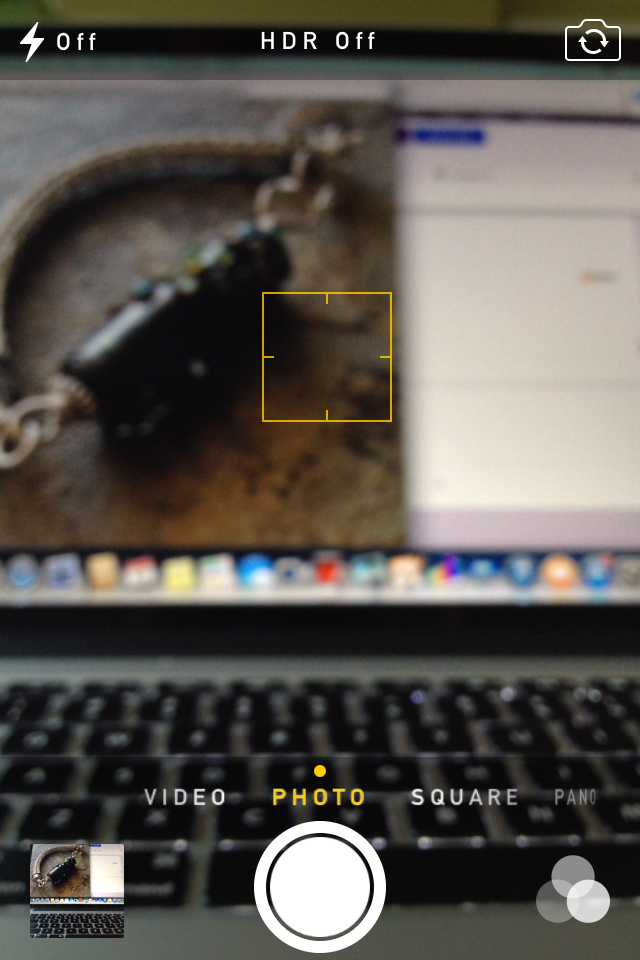
How does one adjust the focus? I can tell you how to do it on my phone, but it's kind of tricky to show it. Use your finger to touch the area of the screen on the object you want to focus on. The other thing this does is automatically adjusts the color/lighting to the object your focusing on to (usually) make it better. 

Here's a screen shot of the camera working on focusing right after I've touched a spot on the screen. The yellow square is the area I am having the phone focus on. Once it's focused, the square goes away. 


The next photo the bracelet fills the frame and isn't bathed in bright golden light. 


And remember that if you do super tight photos, you will want to show multiple views. 


And for the final example, I photographed this gorgeous beaded necklace by Kristen Stevens using one of my Nightmare Insomnia beads. Shadows, sun, too far away to see any of the detail that makes this necklace so special. 


The next one it has been removed from direct sunlight. The lack of shadows helps show a bit more of the detail, but it's still too far away to really draw the viewer in. 


And here is the focal portion with the camera held as close as possible and at a more interesting angle than straight above. You can now see more details in the piece than before. 


The above photo was cropped in Instagram. I used zero filters on it. If I'm selling a piece, I prefer to use no filters so the color looks as accurate as it possibly can. 

However, sometimes I use filters when I'm just showing a piece. I mostly like how the filters highlight certain areas of the photo and add a small border without any actual work. Below are three different filters of the photo above. Having comparisons like this can show you exactly how the filters change the look of the piece you're photographing. The change can be subtle, or striking.  

Mayfair:


Hudson: 


Sierra: 


In the above photo, we get a good look at the focal. But what about the rest? We (your potential customers) want to see the beading. And the clasp. So change the view, rearrange, move the phone. Here's another view of the same necklace above. The focal is blurred and moving off into the distance. The beading is front and center. Notice the empty space in front? All these aspects of the photo work together to create interest, tension, and to keep the viewer's eyes moving. 


And here is the same exact photo, but using the XPro filter on Instagram. It makes the background fade away and adds more emphasis to the beading. I love this look! 


Will I ever really throw out my digital SLR camera? Heck NO! But knowing how to take great photos with a smart phone really makes having an online presence easier. 

Go forth and take great photos!

-Jen Cameron


Wednesday, April 2, 2014

There's an App for that

Computers revolutionized the way we do business, and now smart phones and tablets have made running a business in the digital age mobile. I thought I would share a few of my favorite apps that have made it possible to be on the road and still get things done without a computer, a day planner, a notebook, and a knuckle buster. 

For clarity, I'm working with an iPad 2 and an iPhone 4S. I don't know about Androids or any other types of smart phones or tablets, but I'm sure they can run many of the same apps or have a similar app. 

Square: 

I've been using square for a few years and it has made my life, and many other business owners lives easier. Even my hairdresser is using it now! 


The first year I used it, some customers were leery, others amazed. Now most of have seen one in action or at least seen the commercials for them. But it's so easy to use. Go to the Square website to sign up and get your FREE card reader. Go through the registration process, download the app to your phone and/or tablet, and you can take credit cards anytime anywhere. Without monthly fees for the privilege of a merchant account, without huge per transaction fees. And Square automatically initiates a transfer to your account on file the next business day. 

I cannot tell you how much Square has saved me compared to the inexpensive merchant account I used to have. The bank where my business accounts are kept actually tried to talk me into their version of Square. I read the informational sheet they handed me and laughed. I told the teller no thanks because they still want to charge a monthly merchant account fee plus the per transaction fee was much higher. She said they came up with this to compete with Square. I told her they need to keep trying. 

I know Paypal has their own card reader, and perhaps others do as well. I know nothing about them and recommend research before making a decision for which one you want to use. 

TurboScan:

I have one of those all-in-one copier/printer/scanner. But it's slow. And it's in the basement. And it's so darn inconvenient. And sometimes I am at the lake, which has an inexpensive laser printer, but no scanner. One day I needed to email or fax a document, but I was out of town and would have had to go to Kinko's to accomplish this. So I searched for a possible app and found TurboScan. And I have used it for all kinds of things. Yesterday I used it to email my contract for Bead Fest Philly in August. 

Here's the app in the app store. It also shows what the opening screen looks like. Get your document and click on camera.


Set your document on a dark background for best results. Then click the shutter button at the bottom. 


It automatically cuts out the background for you, but you can tweak it if you want to. Then a screen comes up where you can change how dark the writing is. I've always stuck to the darkest setting. 


The next screen gives you the option to change properties and give the document a name (center bottom), email (left bottom), or add another page to the document (right bottom)


Here's the page that comes up if you click on the pen in the center:


And options for distributing your document: 


Evernote:

What I love most about Evernote is you can add something to it, and it updates it across all your devices where you've installed it: phone, computer, and tablet. I've barely begun to scratch the surface of what this app can do, but I love it. 

I'm not very good at carrying around pen and paper. I always have good intentions, but it never happens. Evernote is where I record my business mileage. I have another note where I collect quotes. You can take a photo of something and write notes about it so you aren't wondering later why you took that picture or what you wanted to remember about it. Write lists. Upload your beading patterns or any PDF to it. I love this thing. It's my pen and paper. 


Facebook Pages: 

If you're on Facebook, and you have a Facebook page for your business, you need Pages. It allows you to update your page as your business. You can upload photos you've taken with your phone to your page. Without Pages, you can't really interact with your community to your full potential. And if you have multiple pages, you can easily switch between each page. 

Instagram: 

Supposedly people (mainly the younger crowd) are leaving Facebook in droves for places like Instagram. My customers aren't teens, but who knows how long it will be before us older people follow in their footsteps (if at all?). But that's not the only reason I love Instagram. I love photos. And I love sharing photos. Instagram has fun effects AND it's so easy to share these photos to other platforms like Facebook, Twitter and Flickr. And I can take a photo of something right out of the kiln, take a photo, edit it, and share it with a few clicks. 


Camera:

I know, this one comes pre-installed on your phone. But I use it more than any other app and it has saved me SO MUCH TIME in uploading a kazillion photos to the computer, sorting, editing, then sharing the photos. 

In fact, my next blog post (in two weeks) will be some tips on using the camera on your phone to take better photos of your work. 

Until then,

-Jen Cameron